What is the best visual schedule app for autism?
There is no single best app for every autistic child. The right one depends on your child's age, whether they can read, and who will hold the device. These are the apps parents most often compare. We make Visual Schedule, so read this with that in mind.
- Visual Schedule (our app). Made for young children from about age 3, including non-readers, and also used by older kids who run their own routines. Runs on iPhone, iPad and Mac, with 130+ icons, your own photos, a full-screen visual timer, Kid Profiles and ready-made routine templates. It can also be used as a first-then board. Free to download, with optional premium features. There is no voice recording for tasks and no Android version.
- Choiceworks. A picture-board app by Bee Visual for iPhone and iPad, with schedule, waiting, feelings and feelings-scale boards. Cards can hold pictures, video and your recorded voice, and the developer states it has no ads and no tracking. It is a one-time purchase with no free version.
- First Then Visual Schedule HD. A visual supports toolbox by Good Karma Applications for iPad and iPhone: first-then boards, schedules, task analyses, social stories, choice boards and video models, with a large symbol library. It is a one-time purchase and available in English only.
- Tiimo. A visual daily planner with a color-coded timeline, focus timer, widgets and Apple Watch support, co-designed with ADHD and autism experts. It has a free basic version. Its App Store age rating is 9+, and it is built for teens and adults who plan their own day.
A simple rule: if a young child will look at the schedule, choose a picture-first app such as Visual Schedule or Choiceworks. If a teen will plan their own day, look at Tiimo. Our full comparison of visual schedule apps covers ads, parent controls, offline use and where each app beats ours.
Why visual schedules work for autism
Many autistic children process pictures more reliably than spoken instructions. A spoken plan disappears the moment it's said; a visual schedule for autism stays visible, in order, all day. That visibility does three important things:
- It makes the day predictable. Anxiety often comes from not knowing what happens next. When the whole sequence is visible, uncertainty drops, and so does the resistance that comes with it.
- It softens transitions. Moving between activities is a common meltdown trigger. A schedule turns "stop playing NOW" into "look, after play comes bath," which the child saw coming.
- It builds independence. Instead of waiting for the next verbal prompt, your child checks the schedule themselves. Over time, the schedule replaces the nagging.
This isn't just parent wisdom. Visual supports are an evidence-based practice for autism: the National Clearinghouse on Autism Evidence & Practice's 2020 systematic review lists them among the practices with solid research support, and UNC's AFIRM program publishes a free practice guide on visual supports for parents and educators. For schedules specifically, a 2015 review of 31 studies (Knight, Sartini and Spriggs, Journal of Autism and Developmental Disorders) concluded that visual activity schedules can be considered an evidence-based practice for autistic people from preschool through adulthood, especially when combined with systematic teaching.
Paper cards vs. a visual schedule app
Laminated picture cards work, but they're rigid: printing, cutting, Velcro, and re-making them every time the routine changes. A visual schedule app gives you the same evidence-based structure with photos of your child's actual toothbrush, timers built into every task, and instant edits when plans change.
Build your child's visual schedule in 5 steps
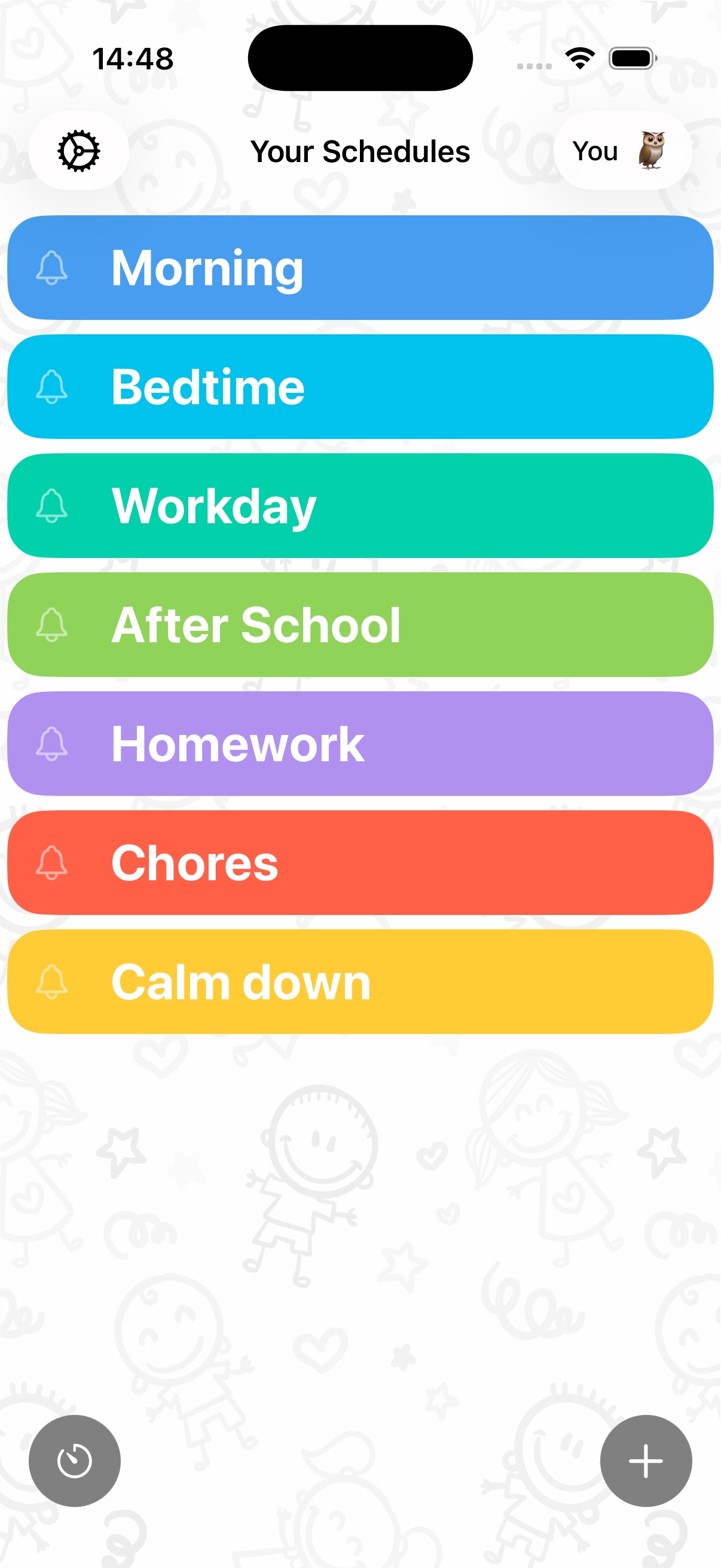
- Download Visual Schedule (free to download on iPhone, iPad and Mac) and create a profile for your child. Kid Profiles keep each child's schedule and progress separate.
- Add the day's activities in order. Start small: 4–6 anchor activities like wake up, breakfast, school, play, dinner, bed. You can start from a routine template and adjust.
- Give every task a picture. Choose from 130+ built-in icons, use a photo of the real object or place from your library, pick a Pixabay image, or generate a custom icon with Apple Image Playground. Real photos are especially powerful for autistic kids: their own bathtub is clearer than a generic drawing.
- Add times and timers where they help. A full-screen visual timer on tricky tasks (getting dressed, tooth brushing) shows how long is left, with a gentle countdown at the end.
- Let your child check tasks off. The tap-to-complete checkbox, and the confetti when the schedule is done, turn following the routine into something rewarding rather than demanded.
What to do when the schedule changes
Life happens: a cancelled therapy session, a surprise visitor. With a digital schedule you edit the tile with your child watching, so the change is seen and processed before it happens instead of discovered mid-transition. Many parents keep a "surprise" icon for genuinely unpredictable slots.
Want more detail on other apps? See our honest comparison of visual schedule apps for kids with ADHD or autism, including where each one beats ours.
Give your child a day they can see
Set up your first visual schedule in five minutes, with icons, photos, timers and confetti included. Free to download on iPhone, iPad and Mac.
Download Visual Schedule free